

System Explorer is a powerful software tool that shows you very detailed information about your system running processes, performance parameters, open connections and more. Besides, the program can also analyze your system processes to detect suspicious behavior and hidden threats, so it helps you keep your system free of harmful viruses and rootkits.
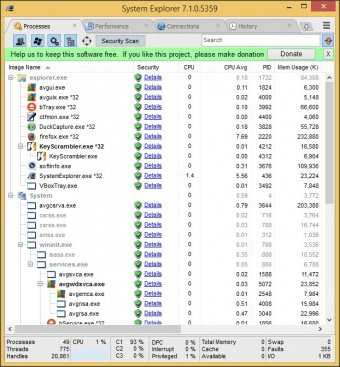
The program's user interface is based on a tabbed panel where each tab shows you complete information about different aspects of your system internals. By default, the main window of System Explorer shows you four tabs - Processes, Performance, Connections and History, however, you can enable or disable many others like Tasks, Modules, Windows, Opened Files, Autoruns, Services, Drivers, Networking, Snapshots, Uninstallers, Users and others. The section that offers the most relevant information about your system is probably Processes. It shows you a hierarchical list of the processes currently running on your system with detailed information, including the instant CPU usage, the average CPU usage, the memory usage, the PID, the virtual memory size and even the parameters under which the process is running. Besides, you can see if each running process is secure, though this requires running a security scan first. This is a very useful feature, as you can identify if anything is going wrong with your system at a glance, and kill the harmful or malicious processes very easily. more






Comments (2)